unleashed-web.org

Enable Vim Spell Check for Specific File Types

| Comments

You can enable spell check in vim, gvim, or macvim by entering command mode1 and typing :set spell.

To make this permanent for every time you open a file in vim you can add this line to your ~/.vimrc2 file:

1
set spell

If you use vim for programming you might not want it to spell check every file. If, for example, you use vim to edit your markdown files for your Octopress Blog AND you also use vim to edit your ruby project you will want to use the autocmd instead:

1
autocmd FileType Markdown setlocal spell

This will only enable spell check if you open a file with type “Markdown”


  1. You can enter command mode by pressing the ESC key.

  2. ~ represents the current users home directory. Similar to the $HOME environment variable.

Frequent Connection Reset

| Comments

UPDATE: As of 7-Nov-2012 (and likely before) this connection reset problem does not appear to be occurring anymore. Thank you Github!


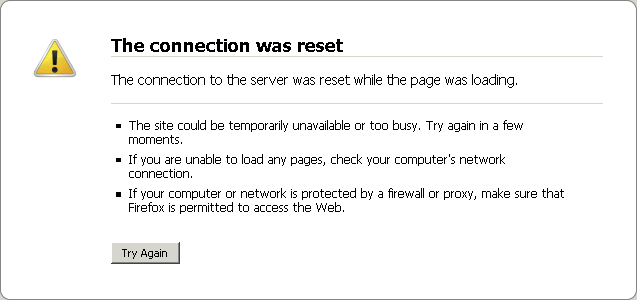
Uhoh.. every once and a while I get this error when trying to access my site: http://www.unleashed-web.org. When I hit “refresh” the problem vanishes (for a short time).

My site is hosted by Github. I began searching other websites that are hosted by github and I noticed that I would occasionally get the same “The connection was reset” error.

I contacted the Github support team and told them about the problem. They were very fast to investigate and respond:

This is a known issue with some of our DDoS hardware that’s in place. We’re currently working with our hosting provider to resolve this issue. Sorry for the inconvenience.

After some googling I realized that the Github servers have recently suffered some DDOS attacks and it seems as though they don’t have a fully working solution in place to deal with that yet.

Thank you to the github team for diligently working through the issues! In the mean time we’ll need to refresh our browsers every once and awhile to load github hosted websites.

Shell Quick Substitution

| Comments

quick substitution
1
^string1^string2

If you find yourself needing to enter a very similar command multiple times this little command line trick that might save you some time. This is really only helpful if your command line is somewhat long and repetitive.

This is admittedly quite a contrived example but I think it gets the idea across:

example
1
2
3
4
5
6
7
8
9
10
11
12
scotmac:~ shewless$ ls file*.txt
file1.txt	file2.txt
scotmac:~ shewless$ for i in `cat file1.txt`; do echo $i; done
foo
bar
apple
scotmac:~ shewless$ ^file1^file2
for i in `cat file2.txt`; do echo $i; done
baz
qux
banana
scotmac:~ shewless$ 

Step by step:

  • I have two files that I want to apply a similar action to:
list files
1
2
scotmac:~ shewless$ ls file*.txt
file1.txt	file2.txt
  • I will run a command on file1.txt to list all of the lines in the file:
command on file1.txt
1
2
3
4
scotmac:~ shewless$ for i in `cat file1.txt`; do echo $i; done
foo
bar
apple
  • I want to run the same command on file2.txt. Note the only input I have provided is the first line.
command on file2.txt
1
2
3
4
5
scotmac:~ shewless$ ^file1^file2
for i in `cat file2.txt`; do echo $i; done
baz
qux
banana

Enjoy!

Enabling Comments With Disqus

| Comments

It appears the default comments option for Octopress is true but you will notice that your Octopress blog does not actually have a comment section.

This is because you need to create and configure a Disqus account first:

enable disqus
1
2
3
# Disqus Comments
disqus_short_name: unleashedweborg
disqus_show_comment_count: true
  • You can see I also set discus_show_comment_count to true (which is optional)

Dynamic DNS With FreeDNS

| Comments

Free DNS offers free dynamic and static DNS hosting. You can visit their website or read more about some uses of their service here.

If you are hosting your website from a server that has a dynamic IP address you might wonder how you can map your domain name (specifically TLD) directly to your server. Sure you can use CNAME records to point your subdomains to another DNS service like no-ip but where is fun in that? Also that doesn’t help your TLD (top-level domain) which needs to be set via an A Record.

Github says:

Be warned: you should not use a CNAME record with a TLD, it may cause issues with other services on the domain, like email.

FreeDNS provides an API to update your A Record as your dynamic IP address changes. They provide several scripts that work in conjunction with a unique “Authentication Token” that allow this to be possible. These scripts are written for windows, linux, and even certain routers! I think these scripts are only available once you have a login (it’s free)!

I wanted to better understand the process and create something light-weight so I wrote my own tcl script to use:

updateIp
1
2
3
4
5
6
7
8
9
10
11
12
13
14
15
16
17
18
19
20
21
22
23
24
25
26
27
28
29
30
31
32
33
34
35
36
37
38
39
40
41
42
43
44
45
46
47
48
49
50
51
52
53
54
55
56
57
58
59
60
61
62
63
64
65
66
67
68
69
70
71
72
73
74
75
76
77
78
79
80
81
82
83
84
85
86
87
88
89
90
91
92
93
94
95
96
97
98
99
100
101
102
103
104
105
106
#!/usr/local/bin/tclsh8.6

# updateIp.tcl
# This is a simple script that will detect the server's external IP address 
# (as seen by the outside world) and update your domain's A Record via FreeDNS
# (freedns.afraid.org).  Of course this implies that you have changed your
# domain to use freedns's nameservers and have your domain configured there
# (it's free!) 

# This script should be run as part of a cron job every ~5 minutes

# Usage:
# Check for updates and apply as necessary:
# ./updateIp.tcl
# Force an update
# ./updateIp.tcl true

#-----BEGIN USER GLOBALS SECTION-----#
# File in which to write logs (should use syslog to rotate)
set g_logFile "/var/log/updateIp.log"

# File that stores the current IP of the server 
# (will be maintained by this script)
set g_currentIp "/usr/local/www/updateIp/currentIp.conf"

# Authentication token that is generated and obtained from FreeDNS for
# your spefic domain
# YOU MUST UPDATE THESE WITH YOUR OWN DOMAINS TOKENS!
set g_authToken [list U2lSMUlBQUoz_______x2 U2lSMUta2Vz_________x3]
#------END USER GLOBALS SECTION------#

#------YOU SHOULDN'T NEED TO CHANGE ANYTHING BEYOND THIS POINT-------#

package require http

# Logs "msg" along with a timestamp to g_logFile
proc logger {msg} \
{
    global g_logFile
    set fp [open $g_logFile "WRONLY APPEND CREAT"]
    puts $fp "[clock format [clock scan now]]: $msg"
}

# Retrieves the external IP address of this server (using dyndns)
proc getExternalIp {} \
{
    set token [::http::geturl http://checkip.dyndns.org]
    set data [::http::data $token]

    regexp {Address: (\d+\.\d+\.\d+\.\d+)} $data -> ipAddress

    return $ipAddress
}

# Retrieves the current external IP address that this server is aware of
# (using the g_currentIp file)
proc getCurrentIp {} \
{
    global g_currentIp

    set fp [open $g_currentIp "RDWR CREAT"]
    set ip [lindex [split [read $fp] "\n"] 0]
    close $fp
    return $ip
}

# Updates FreeDNS to your new external IP.  Also updates g_currentIp so we
# know when we need to update again  
proc updateIp {ip} \
{
    global g_currentIp
    global g_authToken

    foreach part $g_authToken \
    {
        set token [::http::geturl http://freedns.afraid.org/dynamic/update.php?$part]
    	logger [::http::data $token]
    }
    set fp [open $g_currentIp "WRONLY CREAT TRUNC"]
    puts $fp $ip
    close $fp
}

# Main program

# Get the current known IP of the system (stored in g_currentIp)
set currentIP [getCurrentIp]
# Get the current external IP of the system (from dyndns)
set externIP [getExternalIp]

set force [lindex $argv 0]
if {$force eq ""} \
{
    set force false
}

# If our IP has changed (or if we are forcing) then update it!
if {($currentIP ne $externIP) || $force} \
{
    logger "updating IP ($externIP) - force: $force"
    updateIp $externIP
} \
else \
{
    logger "IP Address is up-to-date"
}

Now you simply need to call ./updateIp.tcl in a cron job and your domain will stay updated with your ever changing IP address!

Eventually I will add this to github in case anyone would like to use or improve upon it.

FreeDNS Is Awesome

| Comments

Purchasing your own domain name is inexpensive and is a great way to setup a personal email address or website.

You can use Free DNS to map your DNS to an appropriate mail server or web server.

Here is an example that allows me to use “gmail” with a personal email address shewless@unleashed-web.org using MX records.

unleashed-web.org (G)	MX	10:alt1.aspmx.l.google.com
unleashed-web.org (G)	MX	10:alt2.aspmx.l.google.com
unleashed-web.org (G)	MX	10:aspmx.l.google.com

In order for this to work you also need to configure Google Apps to enable your email service. This service is free for personal use.

It also points http://www.unleashed-web.org to where this website is hosted (github):

www.unleashed-web.org (G)	CNAME	shewless.github.com

Lastly if you want your TLD (top level domain) to work you must also add an “A record” that will point to a specific github IP address:

unleashed-web.org (G)	A	204.232.175.78

See This Github help article for more information.

This website is powered by Octopress which can be freely deployed on Github. Please keep in mind that octopress defines itself as “A blogging framework for hackers” so it all depends on how much time you want to invest. If you’re looking for something simpler there are many other way to create and host websites and blogs (most of which will cost a bit of money).

The entire cost for your own email address and website is only the cost of the domain name itself (usually approx $15/year)!